
WebView and YouTube playback
WebView playback behaviour has changed over time. Before changing a system provider, check GitHub Releases and update PipePipe; the steps below explain the difference between an obsolete version gate and a provider that Android cannot start.
Start here: check PipePipe before replacing WebView
Older PipePipe builds rejected some WebView providers by version number. That gate was later removed. Check whether the app is up to date before replacing a system component.
| What you have | What it means | First action |
|---|---|---|
| An up-to-date app | It needs an active WebView provider that Android can initialize; the old hard minimum of major version 80 no longer applies. | Keep the provider selected by the ROM. Do not replace it only because it is old. |
| An older app build | It may still enforce the retired minimum-version check. | Update PipePipe before changing the system provider. |
| No provider exists or initialization fails | Android is not exposing a usable provider to PipePipe. | Check WebView implementation and the provider state. |
Earlier builds actively enforced the requirement shown in this message:
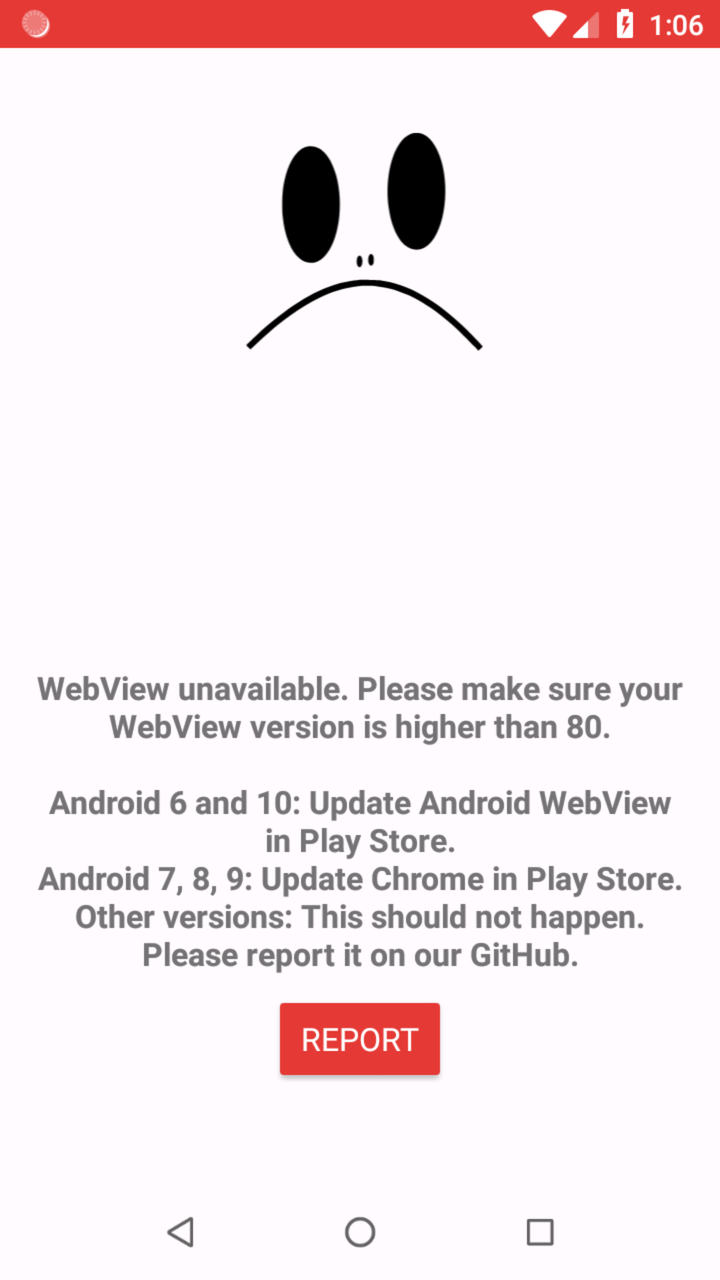
WebView unavailable. Please make sure your WebView version is higher than 80.
Later builds removed that version gate, but the same generic text is still used when the WebView runtime is unavailable. On an up-to-date build, the message does not prove that the provider is below version 80: Android may expose no provider, or the selected runtime may have failed to start. It is not a request to sign in to YouTube and does not prove that the phone itself is too old. Install the latest stable release, or the exact prerelease requested by an issue, before replacing the system provider.
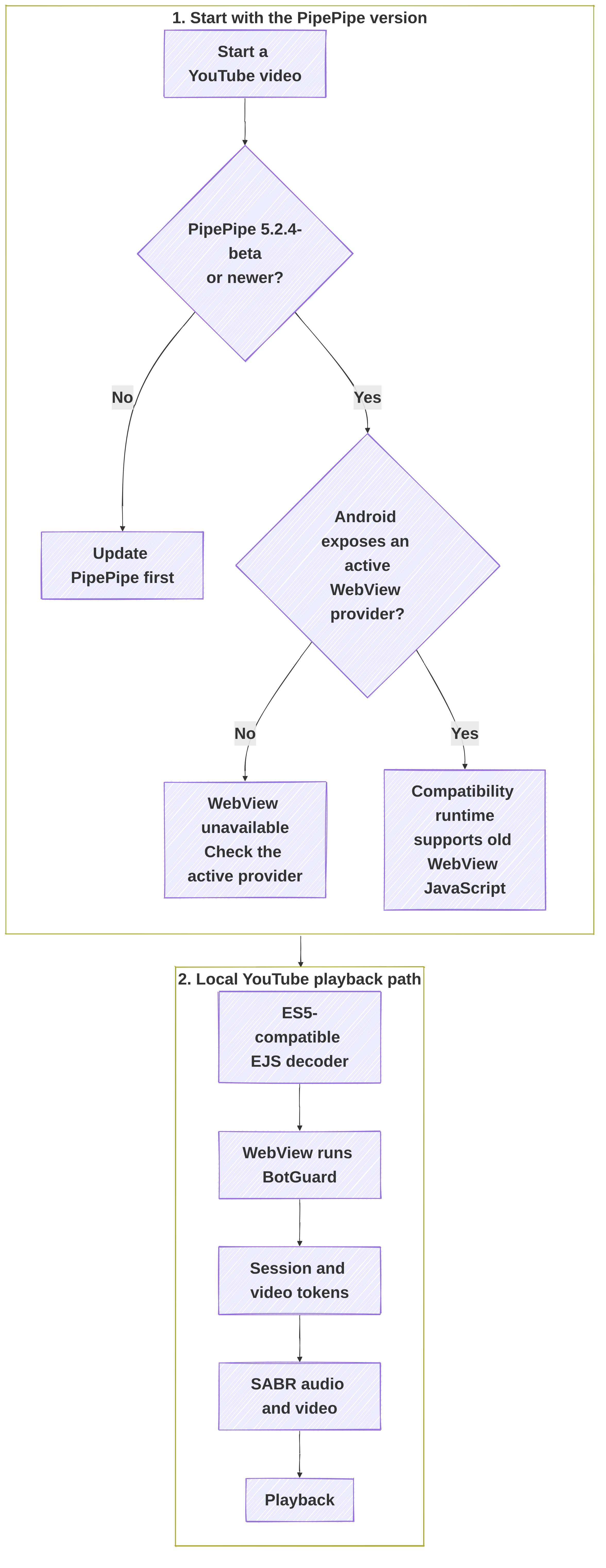
Why PipePipe checks WebView
Some YouTube streams use SABR, a session-based delivery protocol. PipePipe uses Android WebView locally for two JavaScript jobs: decoding YouTube player data through EJS and running BotGuard to obtain short-lived session/video tokens. Google Play Services are not part of this path.
The updated compatibility path uses ES5-compatible EJS assets, polyfills, and an older-JavaScript BotGuard bridge. It does not rely on the retired major-version-80 gate or the modern-JavaScript capability probe. PipePipe still checks that Android exposes a provider and that its runtime actually starts; a missing, disabled, vendor-locked, or broken provider can therefore still fail.
This has three consequences:
- Changing YouTube endpoint does not replace the local WebView runtime.
- An old provider is no longer rejected only for its version number.
- A recent provider can still fail to initialize. That needs a log and provider details, not repeated APK installation attempts.
For the implementation-level explanation, read the SABR guide and Attestation.
Check the active WebView provider
- Open Android Settings.
- Enable Developer options if they are not already available.
- Open WebView implementation. The name and location differ between devices.
- Verify that a provider is selected and enabled. Note its package name and full version.
- Restart PipePipe after changing or updating the provider.
Android 6 may not expose the WebView implementation selector. Its provider is normally fixed by the ROM; check the Android System WebView version under Settings → Apps and use only the ROM's supported update path.
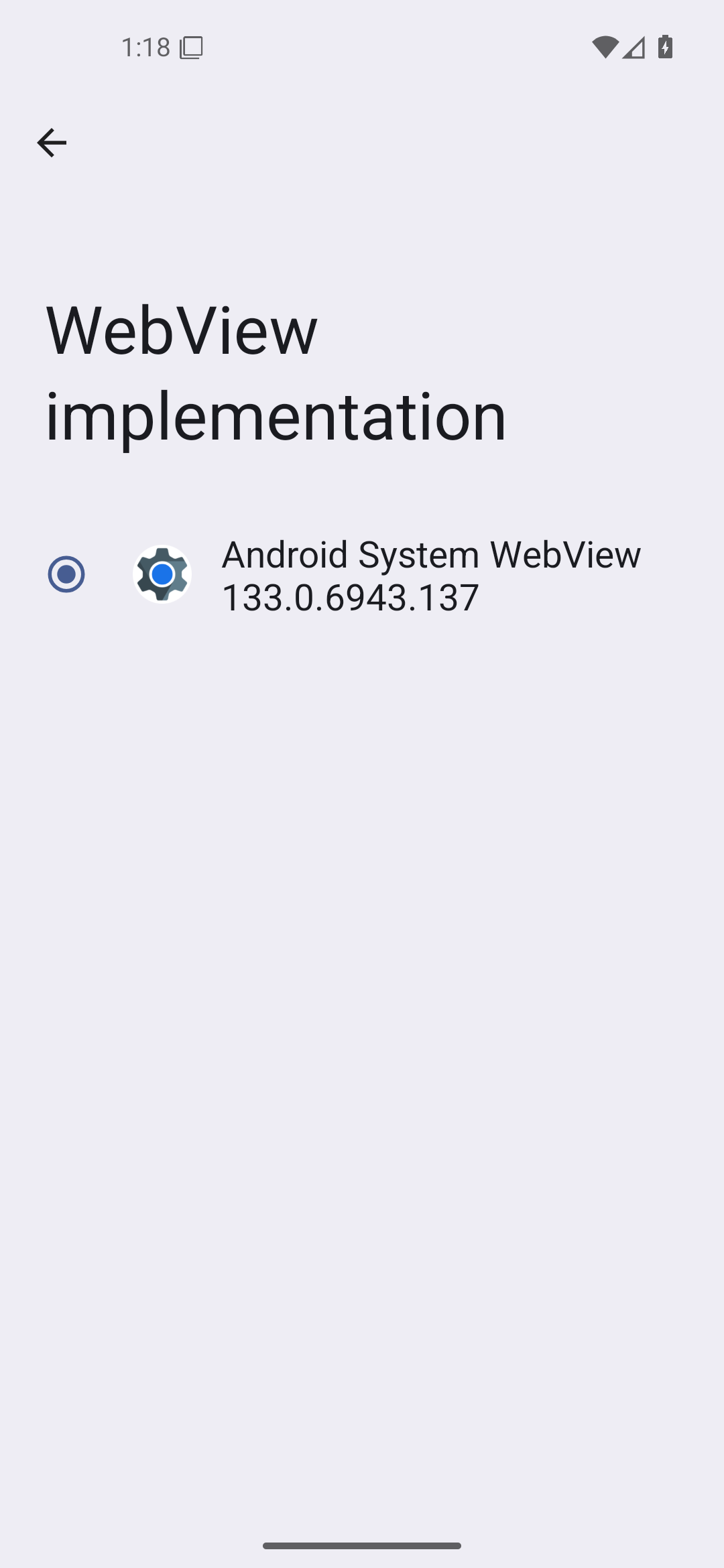
Reference capture: Android 16/API 36. The provider name and version are examples; report the values shown on your own device.
With an up-to-date PipePipe build, the provider bundled with an old ROM may be enough. We verified real playback with the stock providers from Android 6, 7, and 8. Do not install Chrome merely because the phone runs Android 7–9.
On the usual Google setup, Android 7–9 may expose Chrome as WebView. A de-Googled ROM may expose a standalone provider instead. What matters is the provider that Android actually selects, not whether an unrelated Chrome or WebView APK is present in the app list.
Privacy-focused and vendor Android builds
Some operating systems offer a different WebView provider; some devices permit only the vendor's provider. Keep the ROM-supported provider when it works. PipePipe cannot install, select, or replace a system WebView provider for you.
What we verified on old Android without Google services
We tested an x86_64 PipePipe build with the updated compatibility path on clean AOSP images without Play Store, Google Play Services, or Chrome. We kept each image's original WebView and opened the same public YouTube video.
| System | Original active provider | Verified result |
|---|---|---|
| Android 6.0 / API 23 | AOSP com.android.webview 44.0.2403.119 | Shared runtime ready, EJS decoding and token minting succeeded, moving SABR playback verified. |
| Android 7.0 / API 24 | AOSP com.android.webview 52.0.2743.100 | Moving SABR playback verified without installing Chrome. |
| Android 8.1 / API 27 | AOSP com.android.webview 61.0.3163.98 | Provider selected by Android, moving SABR playback verified. |
These are end-to-end playback results, not tests that stopped after loading a feed, thumbnail, or video page.
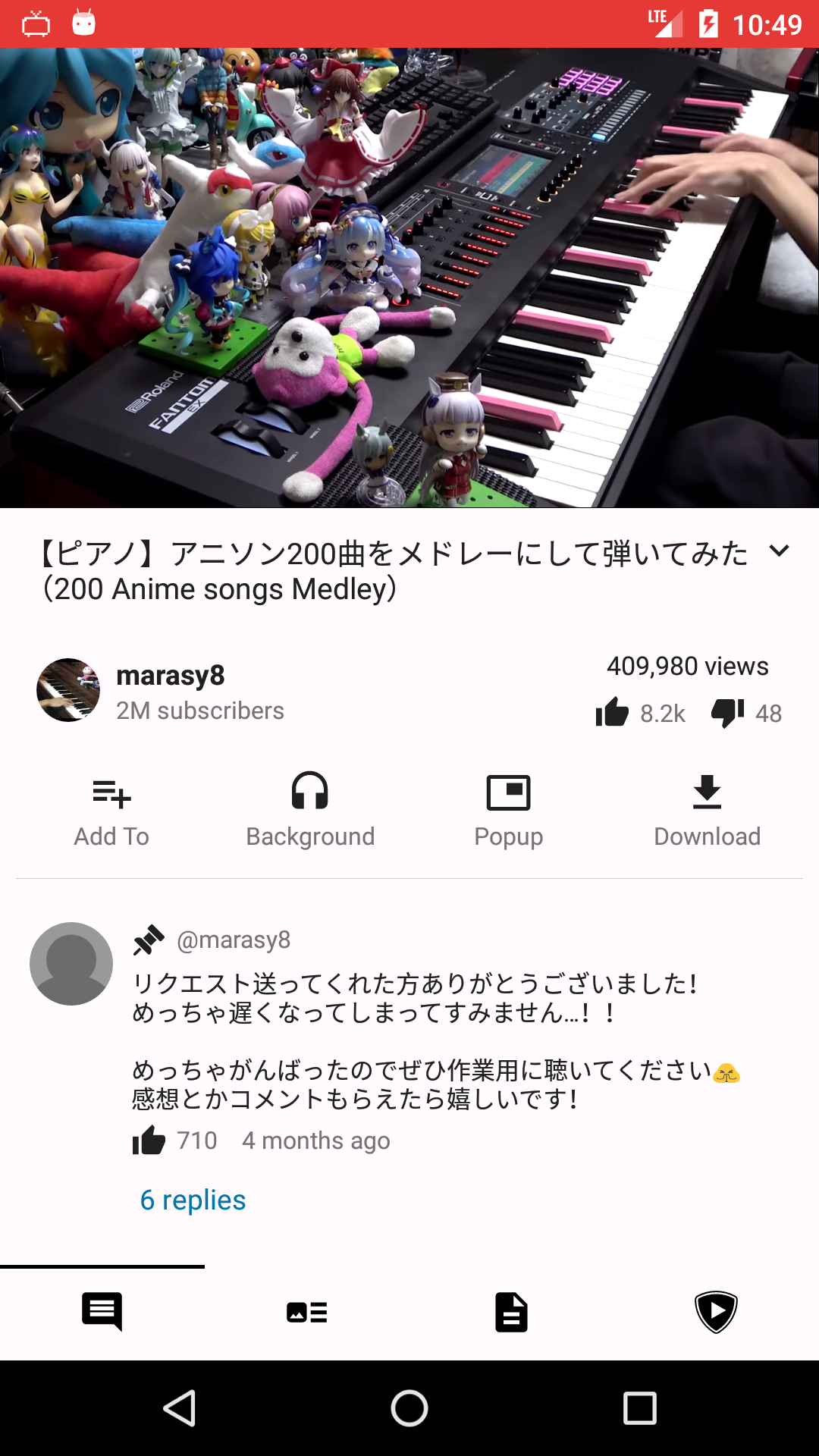
Android 6/API 23 · original AOSP WebView 44 · no Google services. 1 highlights a real frame from the moving video.
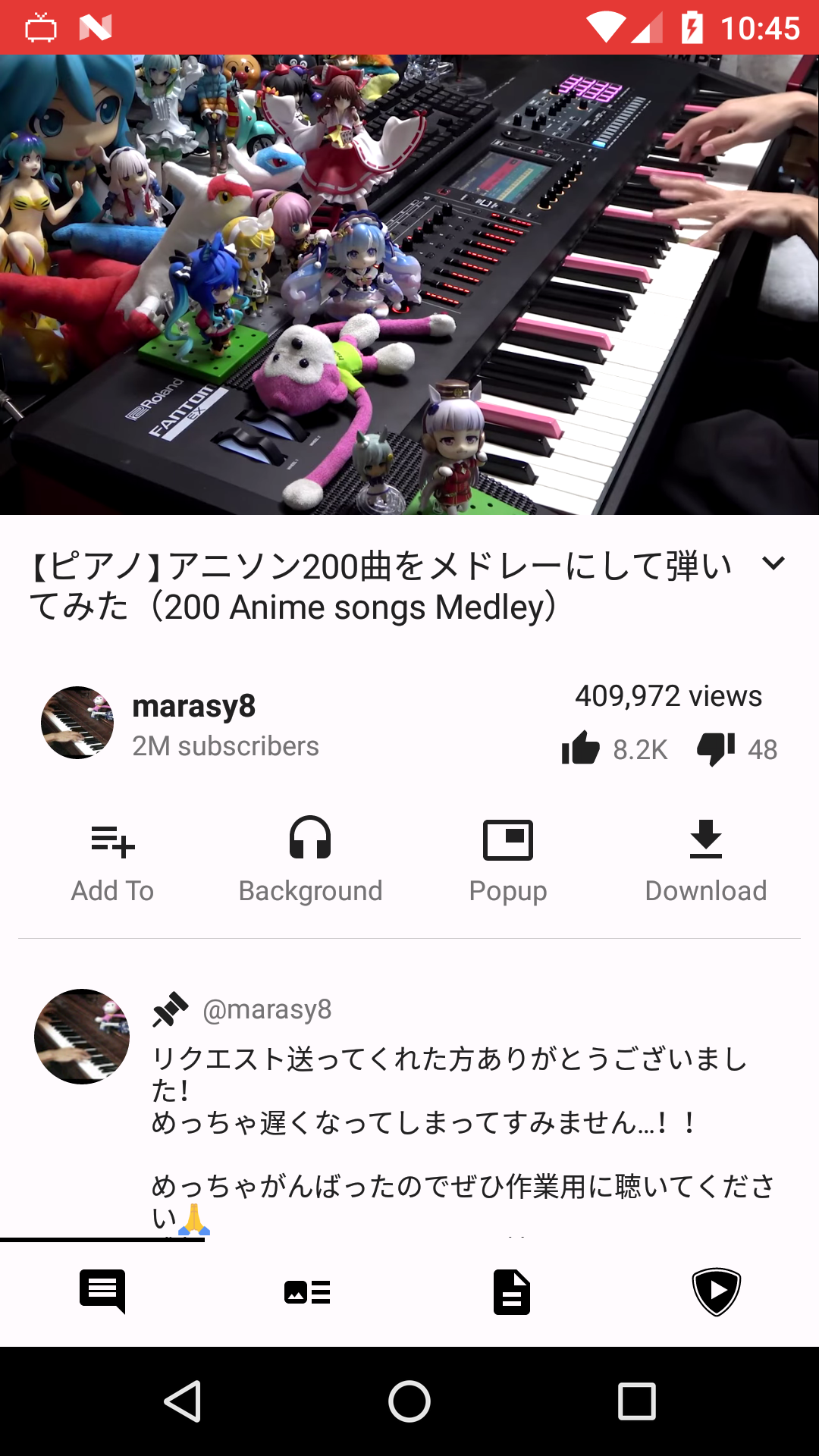
Android 7/API 24 · original AOSP WebView 52 · no Chrome or Google services. 2 highlights moving playback.
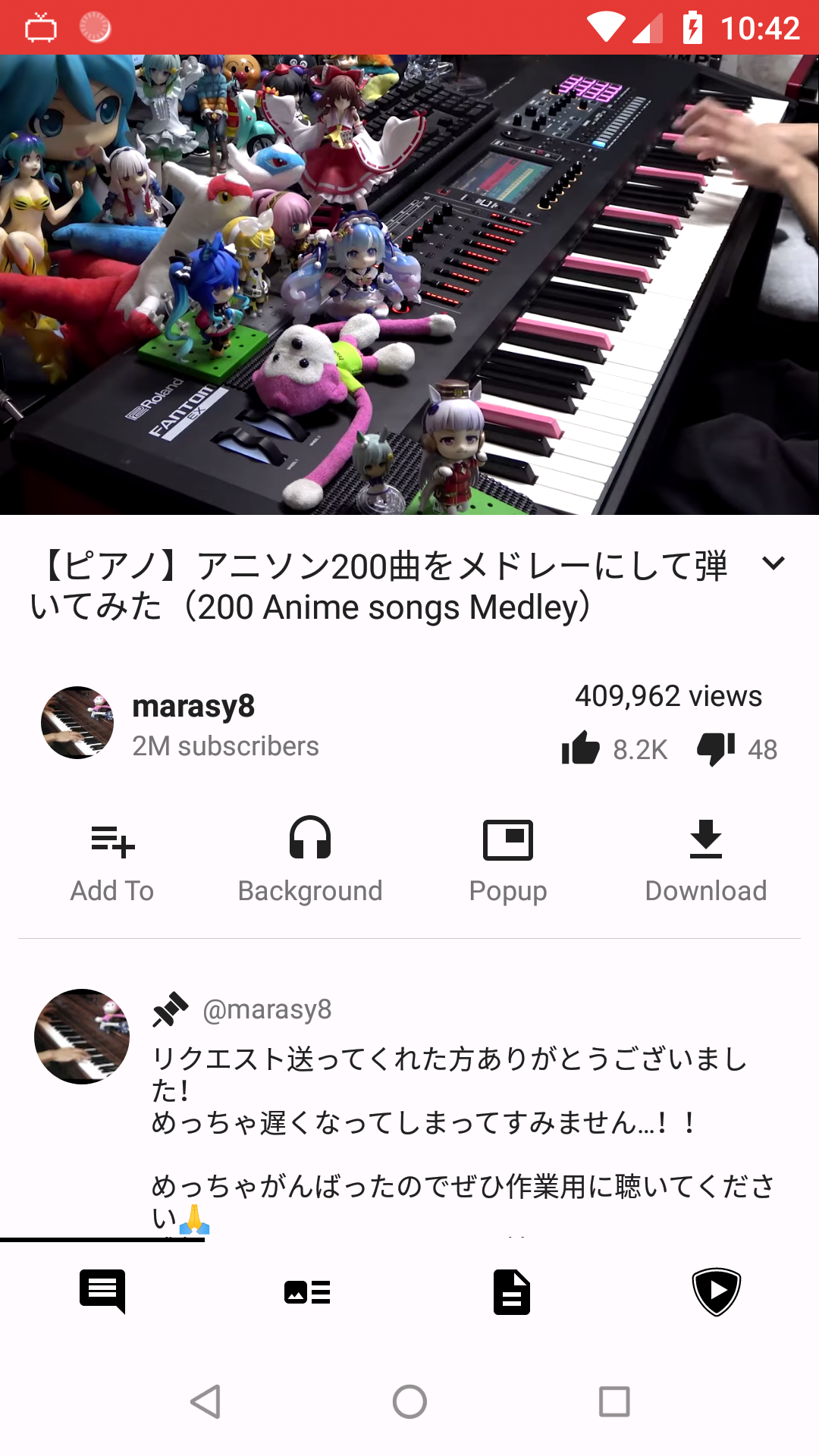
Android 8.1/API 27 · original AOSP WebView 61 · no Chrome or Google services. 3 highlights moving playback.
Why earlier captures required a WebView update
An earlier PipePipe build rejected providers below major version 80 before playback. On the same clean systems, WebView 44, 52, and 61 therefore produced the exact WebView unavailable message even though feeds still loaded.
Our earlier controlled tests made that build play after integrating WebView 119 on Android 7 and WebView 131 on Android 8 as trusted ROM providers. Those provider replacements are no longer required with the updated compatibility path.
Visual check when an error remains
If an up-to-date build still reports WebView unavailable, open Developer options → WebView implementation. The selected radio button and complete version must both be visible. Merely installing an APK is not enough.
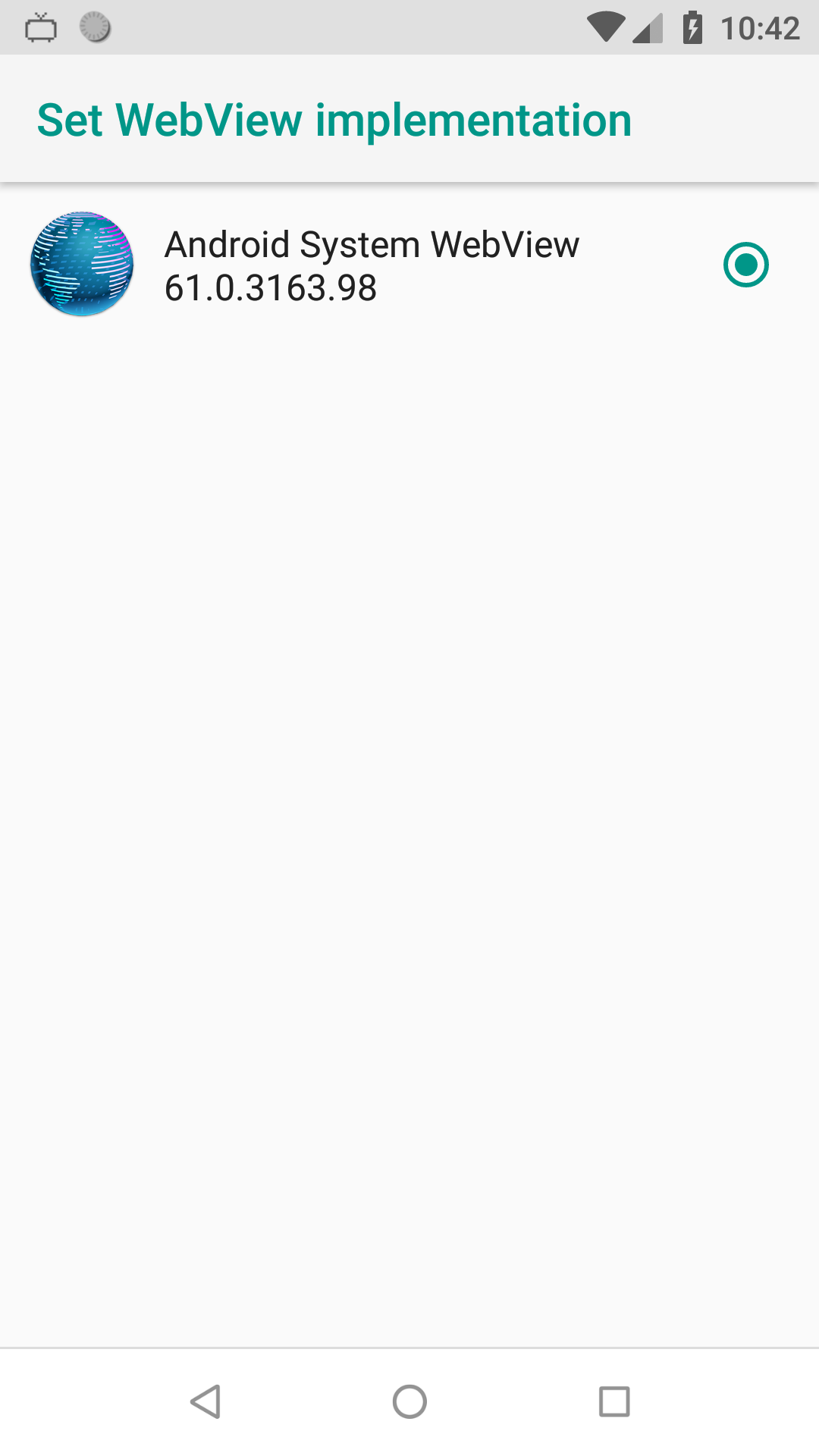
Android 8.1/API 27 · original AOSP WebView 61 · no Google services. 4 highlights both the selected provider and its full version. The Android 8 playback capture above verifies that this same provider actually worked.
Then fully close PipePipe, reopen it, and play a public YouTube video. Loading a feed or thumbnail alone does not exercise the complete EJS, BotGuard, token, and SABR path.
A selected provider can still be incompatible
We also tested Cromite SystemWebView 138.0.7204.169 because Chrome 138 is the last Chrome family supporting Android 8 and 9. Its manifest declares API 26 as the minimum and Android 8.1 selected it, but the provider failed during initialization because android.webkit.PacProcessor was missing from that OS. PipePipe then received an unusable WebView. This build is therefore deliberately not listed below as a working Android 8 download.
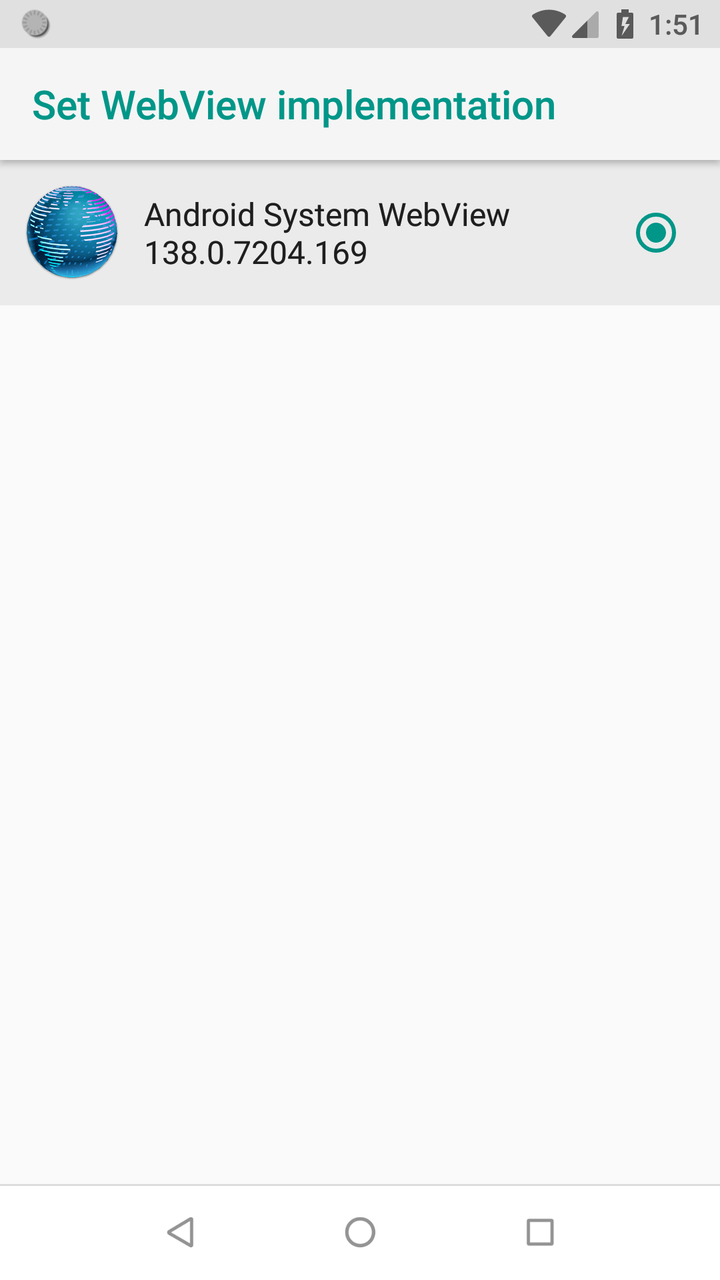
Diagnostic capture: Android 8.1 accepted WebView 138 in the provider list. 6 shows why the selected radio button is necessary evidence, but not sufficient proof of compatibility.
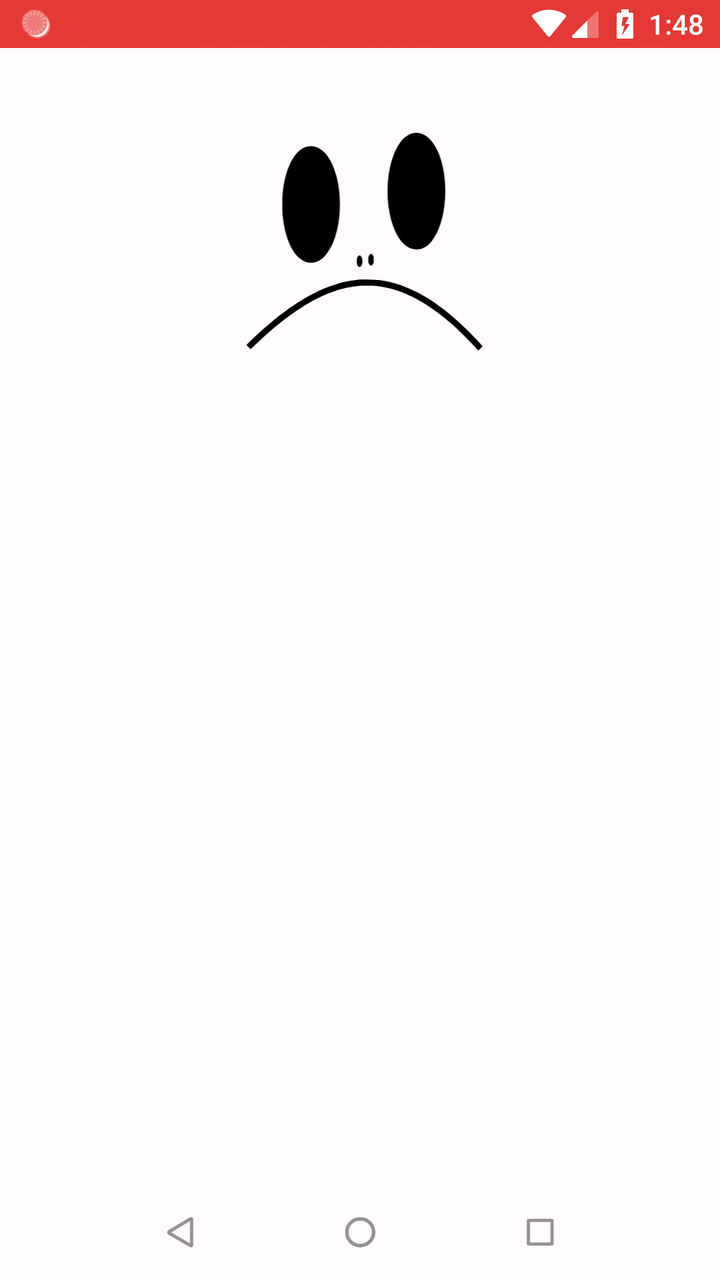
Diagnostic capture: the failed WebView rendering surface after provider initialization failed. 7 is not a PipePipe-specific error page; the Android log identifies the missing framework class.
The tests establish three different facts:
- PipePipe does not require Google Play Services or Chrome for local SABR playback.
- PipePipe's compatibility code, not a provider replacement, made WebView 44, 52, and 61 usable again.
- Android still decides which WebView package is trusted and active. Sideloading an APK that never becomes the selected provider changes nothing. Chromium documents provider registration as a system-integrator task in its AOSP WebView integration guide.
Playback compatibility is not a security update
The stock providers tested above are old and no longer receive Chromium security fixes. PipePipe making its local JavaScript compatible with them does not make the whole WebView safe for ordinary browsing or untrusted content. Prefer a maintained ROM and its supported provider update channel when one exists.
Legacy provider artifacts for ROM maintainers
This section documents provider experiments for older PipePipe builds. It is not needed with the updated compatibility path. These links are pinned to the exact archived releases or commits examined here and are not universal one-tap updates. On the clean AOSP images, a normal install of the Android 7, Android 8, and Cromite test packages was rejected with INSTALL_FAILED_UPDATE_INCOMPATIBLE because the signature did not match the ROM provider. Use only an artifact and signing/update procedure explicitly supported by your ROM.
- Android 6 / API 23, inspected but not playback-tested: Bromite SystemWebView 106.0.5249.163 for ARM, ARM64, x86, or x86_64. See the release page and official checksums. Its package is
org.bromite.webview; the ROM must explicitly allow and trust that provider. Bromite is archived and this build is no longer secure. - Android 7 / API 24, playback-tested: AOSP Chromium WebView 119.0.6045.141 for ARM, ARM64, x86, or x86_64. Each official AOSP archive contains
webview.apk; the integration commit recordssdkVersion=24and all package metadata. - Android 8/9 / API 26–28, playback-tested on API 27: Mulch WebView 131.0.6778.200 for ARM/ARM64 and 131.0.6778.81 for x86/x86_64: ARM, ARM64, x86, or x86_64. The pinned Mulch commit is archived and explicitly intended for compilation into an OS, not ordinary sideloading.
To identify the OS architecture, use adb shell getprop ro.product.cpu.abi. armeabi-v7a means ARM, arm64-v8a means ARM64, and the two x86 choices are mainly relevant to unusual devices and virtual Android environments. A 64-bit processor may still run a 32-bit Android build, so use the ABI reported by the OS.
If an alternative provider installs but does not appear under WebView implementation, it is not active. Reinstalling it repeatedly will not change the ROM's provider allow-list or signing policy. Report the Android version, ROM, installed provider package/version, active provider, and exact installer result.
Rooted Android 8: what root can and cannot fix
On a rooted Android 8.0/API 26 test image, we reproduced the exact state where a Mulch package installed successfully but remained absent from WebView implementation. Android knew about the APK, but its WebView service did not consider us.spotco.mulch_wv an eligible provider.
A framework resource overlay that added Mulch's package and official signing certificate changed that result. After a reboot, Android listed Mulch and dumpsys webviewupdate marked it as both a valid and current provider. Correctly packaged x86 builds of Mulch 119 and 131 then rendered a live HTTPS page on API 26. We also verified that the certificate allowed by the overlay exactly matches the official ARM and ARM64 Mulch APKs.
This validates the provider-registration mechanism, not every rooted phone. The Android emulator on this x86_64 host cannot boot the ARM64 image, so the exact Sony/ARM combination was not run here. The older PipePipe build initialized its shared WebView runtime on API 26, but the tested YouTube stream did not complete extraction; this run is therefore not presented as an API 26 playback pass. The API 27 playback result documented above remains the verified end-to-end test.
Collect these read-only diagnostics before changing system files:
adb shell getprop ro.product.cpu.abi
adb shell pm path us.spotco.mulch_wv
adb shell dumpsys webviewupdate- A Mulch path under
/data/app/with nous.spotco.mulch_wventry under WebView packages reproduces the provider allow-list problem. Valid package us.spotco.mulch_wvplus a matching Current WebView package proves that Android accepted and selected it.- A valid current provider followed by a PipePipe failure needs the application log; selection alone does not prove that JavaScript or video playback works.
Open WebView is one reference implementation of the required Magisk overlay and declares API 26/27 support. Treat it as an expert-only reference, not a routine update: check its release page for current project status. It does not update the provider automatically, and Mulch itself is archived. Back up the complete boot/system state and follow the exact ROM's recovery path; a generic system replacement can remove every working WebView or prevent boot.
Do not confuse these failures
| What you see | What it establishes | Next action |
|---|---|---|
| Exact message requiring a version higher than 80 | The installed app may use the retired version gate. | Update PipePipe before replacing the system provider. |
| Version-80 message after updating PipePipe | The generic WebView error text does not identify the failed check. | Check WebView implementation, then report the provider details and log. |
| No Android WebView provider is available or runtime initialization failure | Android did not expose a provider, or the selected provider could not start. | Check WebView implementation, then report the provider details and log. |
Source error, buffering, or playback stops | Not enough evidence to blame WebView. SABR, network, account, or player code may be involved. | Update PipePipe and attach the generated error report. |
AntiBotException: Sign in to confirm you're not a bot | A YouTube/network or authentication restriction. | See YouTube playback and extraction. |
| Search gives no results | A separate extractor/search problem. | Open a separate report with the service, country, endpoint, and VPN status. |
An app working on the same device does not prove that Android's selected WebView provider works. Different apps may use different YouTube clients, endpoints, or remote services. PipePipe performs its EJS and attestation work locally, and its compatibility code adapts the JavaScript to older providers.
If WebView is still unavailable
- Update PipePipe from the GitHub Releases page. Older builds may enforce the retired version-80 gate; newer builds can show the same generic message if Android cannot provide a working runtime.
- Confirm the active provider again in WebView implementation; installed Chrome or Android System WebView is not enough if Android has not selected it.
- If the provider is vendor-locked or cannot be changed, do not assume that an arbitrary downloaded provider is compatible. Keep the device on a supported, maintained system/WebView update path.
- Send a bug report with the information below.
Provider age alone is no longer the decision point. PipePipe needs the log to distinguish a missing provider, a runtime initialization failure, and a later YouTube/SABR error.
What to include in a bug report
Open a bug report, not a feature request, and include:
- PipePipe version and installation source;
- Android version and device model;
- WebView provider package name and full version;
- the selected YouTube extraction endpoint;
- YouTube login state, network country, and VPN/proxy state;
- one affected video URL and the time of the test;
- PipePipe's generated error report or crash log;
- a screenshot of WebView implementation if the provider is unavailable or locked.
Keep unrelated symptoms, especially search problems, in a separate issue. The two reports require different evidence and may have unrelated causes.