
YouTube playback, network, and sign-in
YouTube's requests and PipePipe's extraction paths change over time. Check the release list before troubleshooting, and include the exact installed build in a report. If an issue asks you to test a particular prerelease, use that build and say so; do not assume an older beta behaves like the current app.
Every YouTube video fails: check DNS filtering
If every public YouTube video fails almost immediately, inspect the generated PipePipe report before changing the extraction endpoint, reinstalling the app, or updating WebView.
Step 1: confirm the DNS signature
If PipePipe displays Network error, tap REPORT:
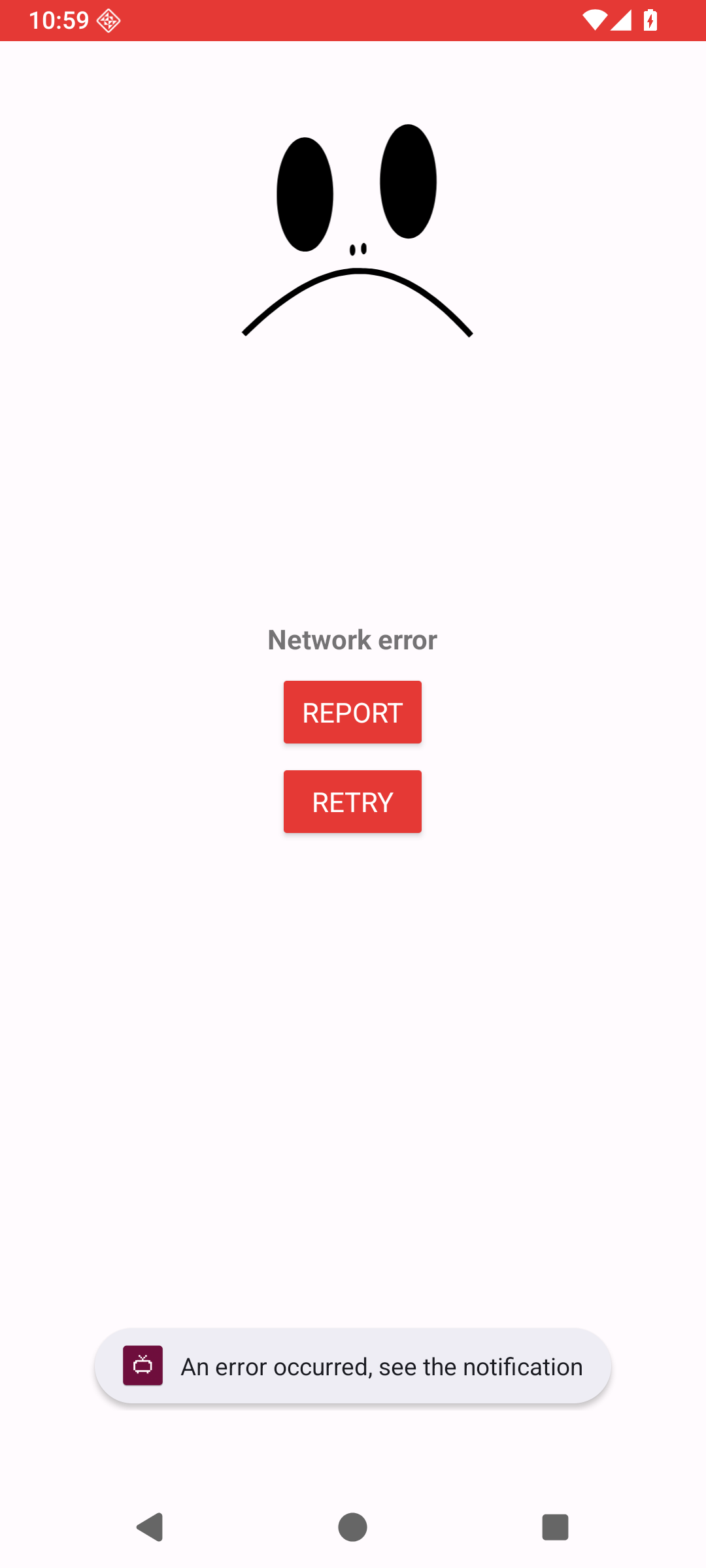
On the Error report page, tap the share icon to copy the generated text into a local note, then search that text:
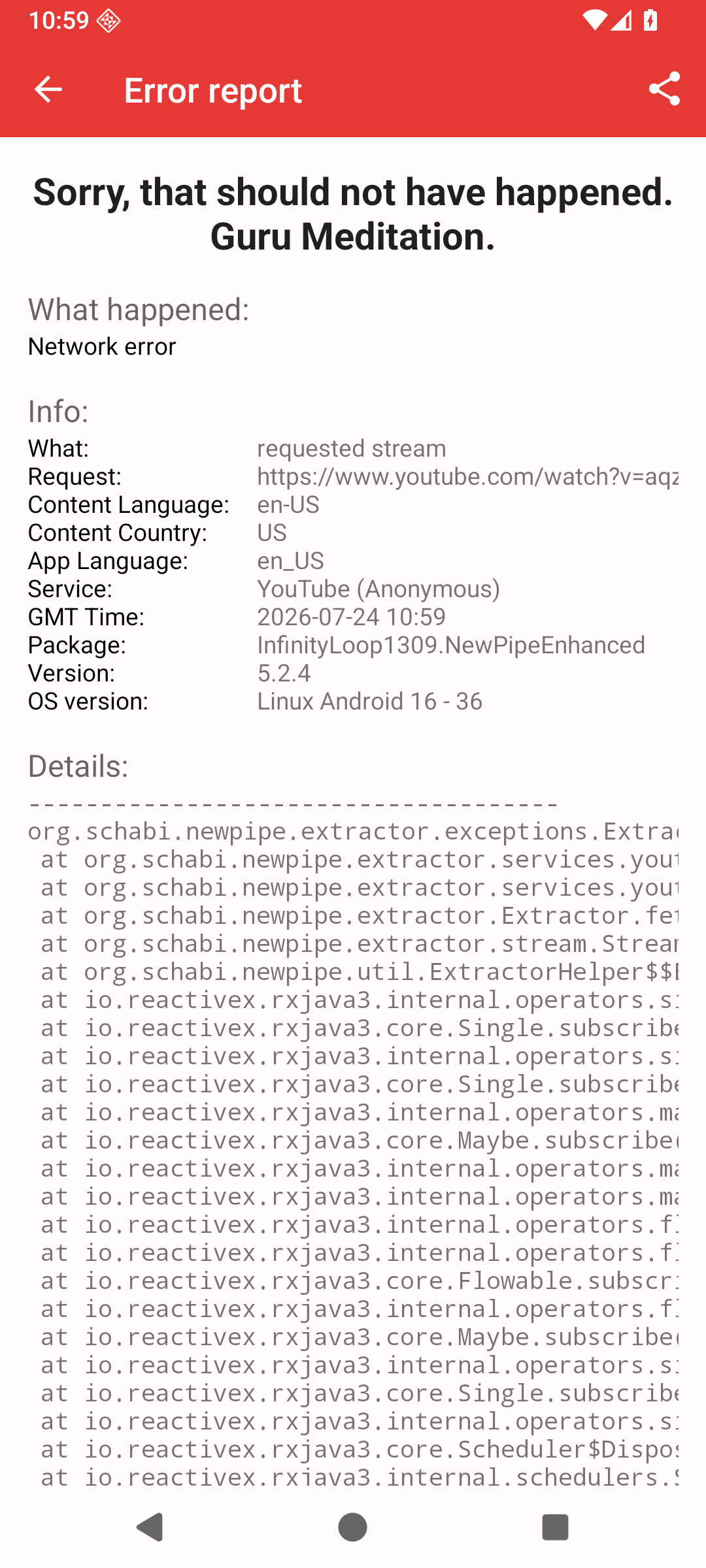
Reference screens from Android 16. The controlled network failure only shows where the buttons are; diagnose the text from your own report.
Search the report for googleapis.com and google.com. These forms identify a local DNS or network block:
jnn-pa.googleapis.com/0.0.0.0:443
jnn-pa.googleapis.com/127.0.0.1:443
localhost/127.0.0.1:...
The request never reached Google
0.0.0.0, 127.0.0.1, and localhost point back to the device instead of the real service. PipePipe cannot work around that redirect by changing its endpoint.
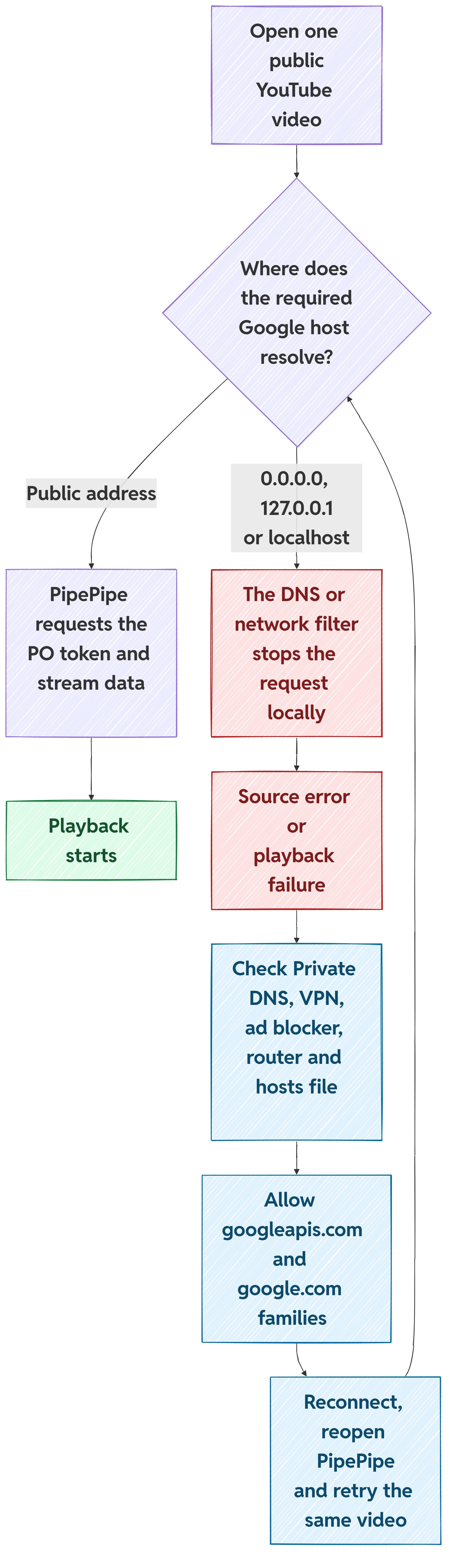
Step 2: find which filter is responsible
Check these layers one at a time:
- Android Private DNS: open Settings → Network & internet → Private DNS. On Samsung devices, the usual path is Settings → Connections → More connection settings → Private DNS. Note the selected provider and check its dashboard or query log.
- VPN or local filter: inspect the blocked-query log of the VPN, ad blocker, firewall, or DNS app while retrying the video.
- Router or self-hosted DNS: inspect the query log and allowlist on the router, Pi-hole, AdGuard Home, NextDNS, or equivalent service.
- Rooted device or custom ROM: check whether the hosts file redirects a required domain to
0.0.0.0or127.0.0.1.
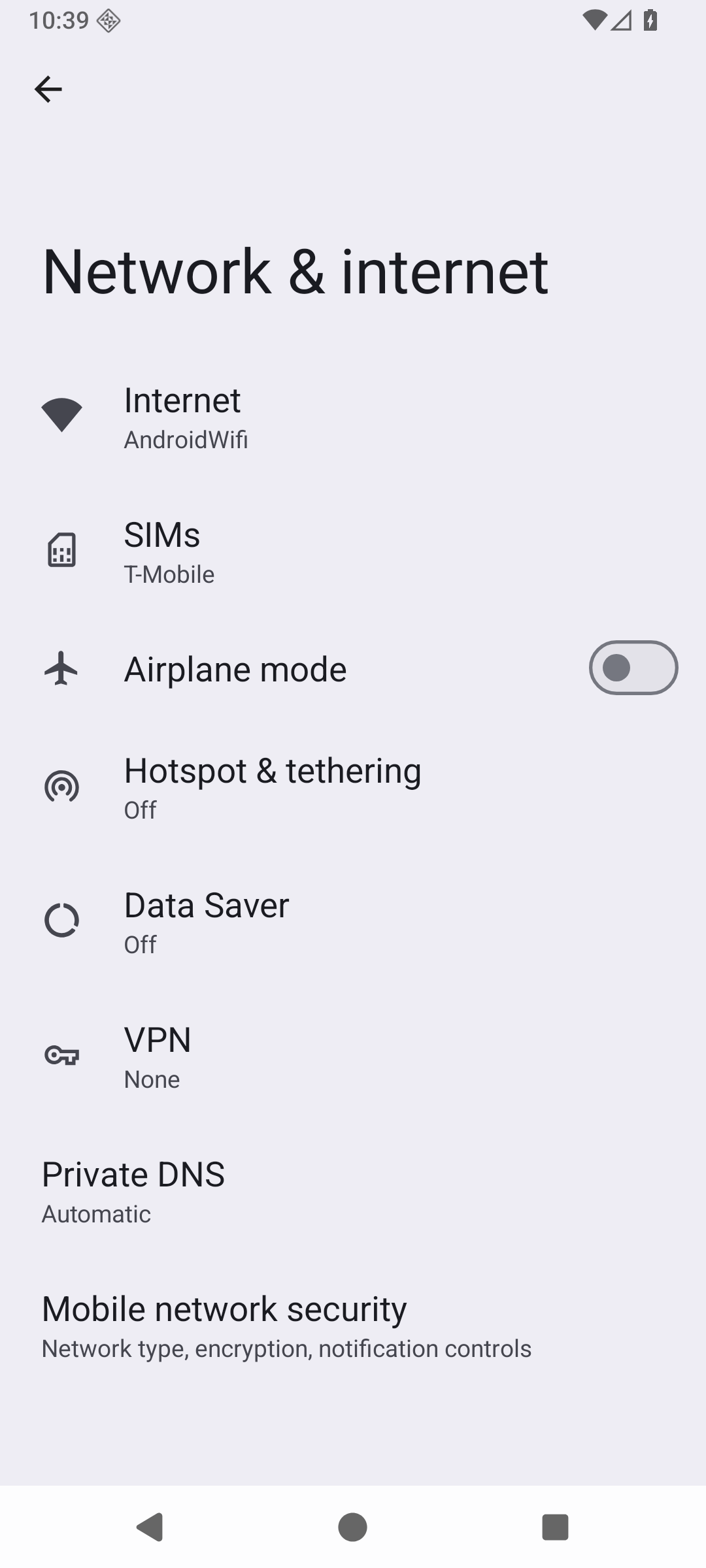
3. Open Private DNS. This page also shows whether a VPN is active.
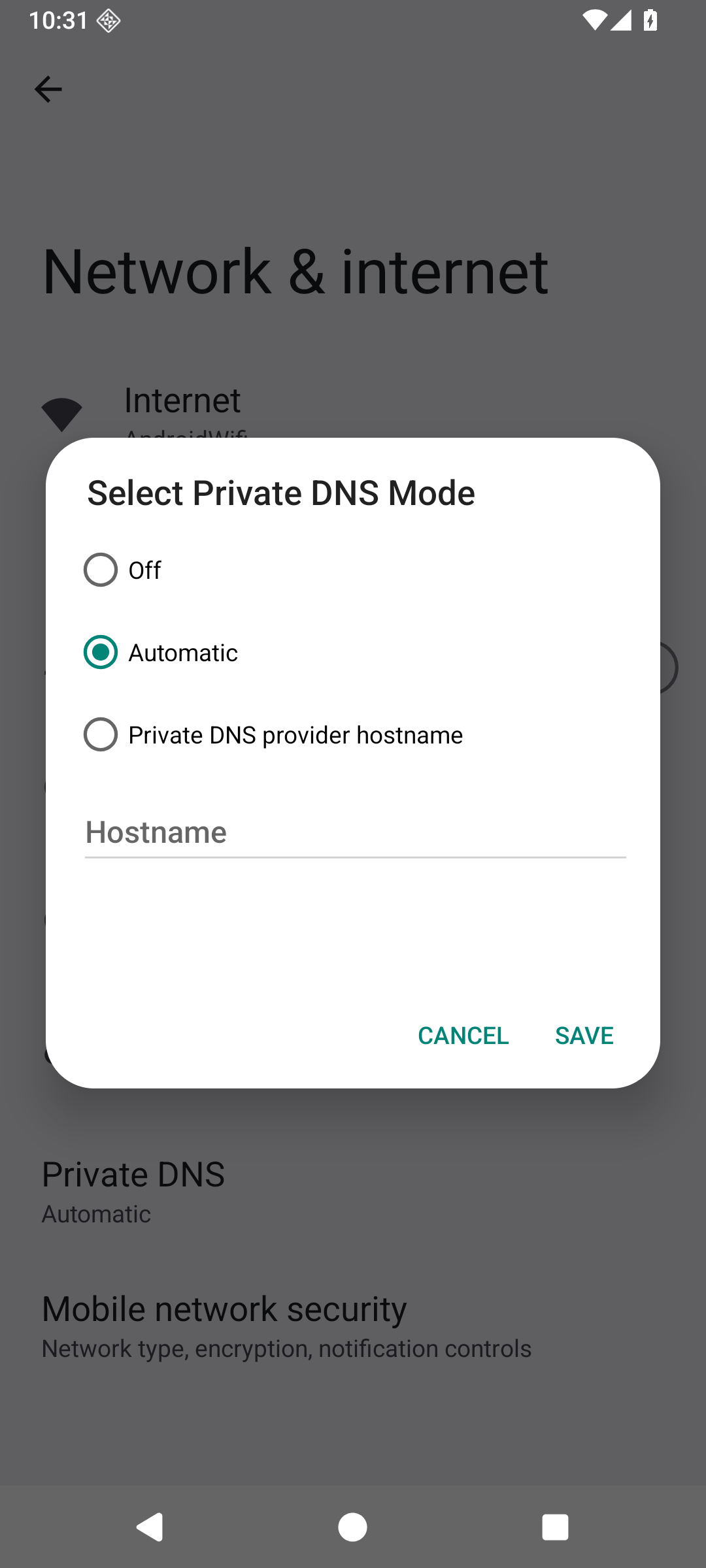
4. Note the active mode or provider. If a provider hostname is selected, open that service's dashboard and query log. Automatic does not rule out a filter on the router or elsewhere on the network.
Android 16 is shown in English. Names and paths can differ by manufacturer.
Step 3: allow the required domain families
PipePipe currently needs:
googleapis.comand all its subdomains, includingjnn-pa.googleapis.comandyoutubei.googleapis.com;google.comand all its subdomains.
Add both families to the allowlist of the component found in step 2. The syntax depends on the tool: it may expect the base domain, a wildcard such as *.googleapis.com, or its own allowlist rule. Configure the allowlist instead of permanently disabling all filtering. Allowing only the host visible today may not cover another host used by YouTube later.
Why PipePipe needs these addresses
The current client contacts jnn-pa.googleapis.com to prepare the proof needed for protected playback, while the extractor uses youtubei.googleapis.com to request YouTube information. If DNS sends either address back to the phone, the exchange stops before playback. This does not require Google Play Services.
Step 4: reconnect and verify the fix
- Reconnect Wi-Fi or briefly toggle airplane mode so stale DNS results are discarded.
- Force-stop and reopen PipePipe.
- Retry the same public video.
- Generate a new report and confirm that the required host no longer resolves to
0.0.0.0,127.0.0.1, orlocalhost.
A temporary test on mobile data or another clean network can confirm the diagnosis. It is not a recommendation to leave privacy protection disabled.
The pinned upstream notice #2757 documents the required domain families. In #2712, the reporter confirmed that allowing jnn-pa.googleapis.com restored playback. #2750 contains the same 0.0.0.0/localhost signature.
If the report shows a real public address
An error such as ENETUNREACH, a timeout, or a connection failure to a real public IP is different: DNS did not redirect the host locally. Continue with the controlled network test below and record the VPN, ISP, country, endpoint, and exact error instead of adding unrelated DNS exceptions.
AntiBotException
Sign in to confirm you're not a bot means YouTube has restricted an anonymous request. It is not a generic request to clear cache or update WebView. Retry once, then test another network or VPN exit. Record the selected YouTube extraction endpoint before reporting it.
Use the same public video for each test. Record the network country/exit and whether the failure is immediate or starts after a few streams. A result that changes only with the network is valuable evidence; do not publish an IP address or account details.
Source error or buffering
These messages do not identify one cause. Update PipePipe, attach the generated error report, and include the affected URL, endpoint, login state, country, and VPN/proxy state. Say whether the failure is at startup, after a fixed time, on quality change, when returning to the app, or after seeking.
For ordinary non-live YouTube videos, MWEB (SABR) is the current session-based playback path when the MWEB response exposes SABR data. VisionOS is a separate anonymous extraction path. Trying another endpoint can be a temporary diagnostic step; it is not proof that the original endpoint or WebView is at fault.
One video (or a few) fail while other videos play
This is a different starting point from “every video fails”. First try the same public URL again after updating PipePipe, then record the result. Do not begin by reinstalling WebView or changing DNS when the rest of YouTube still plays.
- Check whether the item is a live stream, a Short, age-restricted, members only, or otherwise unavailable in a normal browser. Note that in the report.
- Open Settings → Advanced → YouTube extraction endpoint and write down the selected value. Available choices can depend on the installed build and sign-in state. Older screenshots or reports may mention Android VR; trust the options shown in your own settings.
- Retry the same URL once without changing quality, codec, network, or login.
- If it still fails, change only one variable, then retry the same URL. The useful comparison is “same video, one change”, not a list of simultaneous switches.
- Attach the generated report and say whether other public videos still work.
Playback stops around 1 minute with a 403
This one has a recognisable signature: the video starts normally, then stops around the 59-second mark with a Source error, and the report contains ERROR_CODE_IO_BAD_HTTP_STATUS with Response code: 403.
Look at the __Endpoint:__ line of that report. If it says visionos, that endpoint is the cause. YouTube is retiring the VisionOS client, so the player response still extracts and lists formats, but the media requests start being refused once playback is running. It is not a decoder, WebView or DNS failure.
Open Settings → Advanced → YouTube extraction endpoint and select MWEB (SABR). Anonymous installations default to VisionOS and signed-in sessions are already restricted to MWEB, which is why this mostly reaches users who are not logged in.
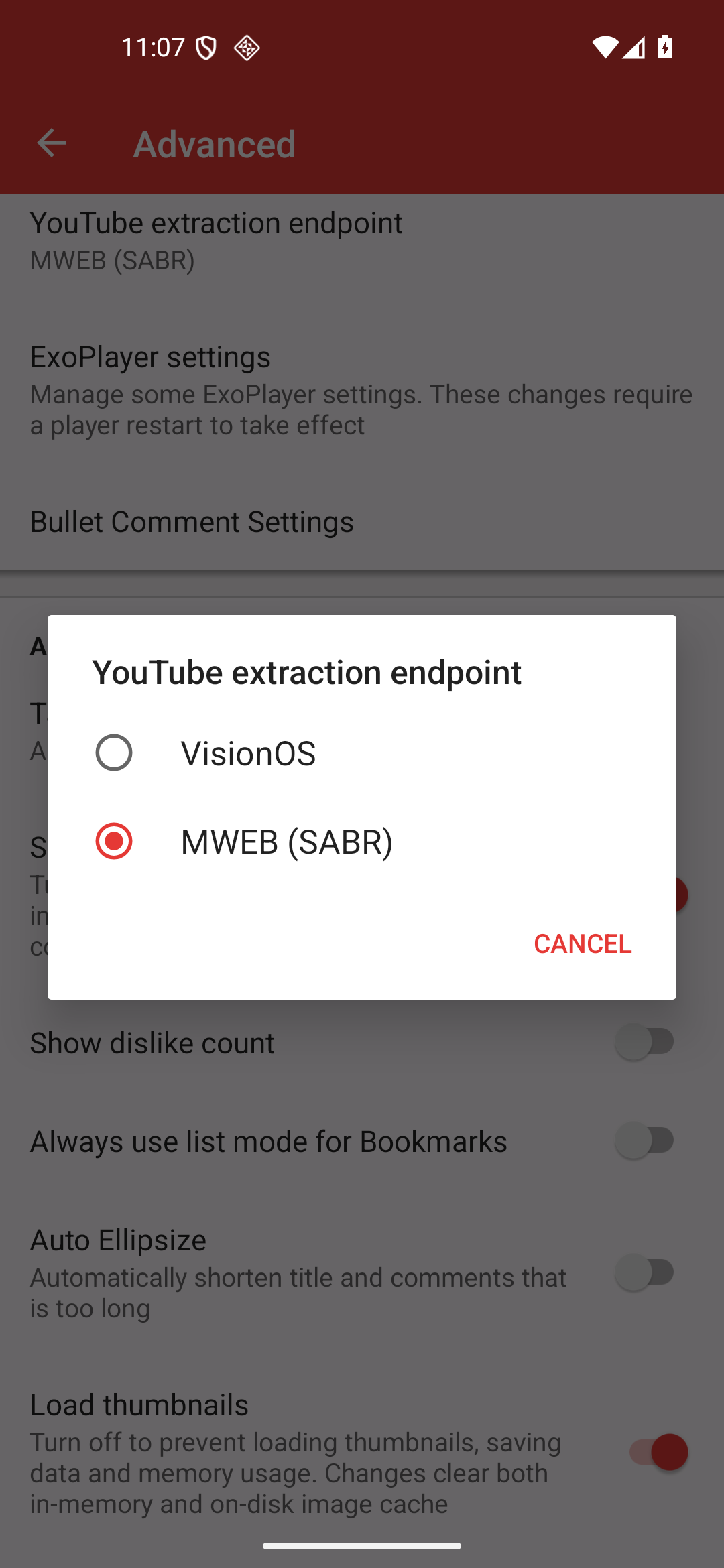
The state to reach: MWEB (SABR) selected. Changing this restarts the app, so reopen the video afterwards.
MWEB needs googleapis.com and google.com reachable, because the proof-of-origin token flow uses them. If playback still fails after switching, check the DNS filtering section before anything else, and attach a new report showing the new endpoint.
The maintainer answers behind this diagnosis are in #2931, #2935 and #2992. #3007 is a recent report with the same 0:59 signature and two visionos logs.
Very long videos and SABR segment counts
A video is not unsupported just because it is long. In issue #2973, a 36-hour video failed with Invalid exact SABR segment count: its MWEB/SABR timeline contained 23,954 segments while the Android client's then-current limit was 10,000. This is a player-side count check, not a decoder or WebView error. PipePipeClient PR #99 tracks a proposed change; use the issue and PR pages to check their current status and whether a fix has reached a published build. A higher ceiling still cannot guarantee playback for every extreme timeline YouTube may return.
If this exact error appears, check the linked issue and release notes for the current status. Include the exact error line, video URL and duration, installed build, selected endpoint, and quality in your report. Another app may use a different YouTube extraction path, so playback there does not prove PipePipe received the same stream data.
An isolated failure can come from the response returned for that particular video or from a format the device cannot decode. It does not by itself show that PipePipe, WebView, or the whole network is broken. If the report contains video/av01, MediaCodec, or a decoder name, follow the MediaCodec guide as a separate codec check.
Endpoint choices
Endpoint names, availability, and defaults can change with the app build, YouTube's responses, and sign-in state. Use the picker in your own installation as the source of truth, and report exactly what it shows.
A controlled playback test
- Start with one public video and record the selected endpoint.
- Try once on the normal network; do not keep changing settings during the run.
- If it fails, repeat once with the same video and note the time/position.
- If appropriate, change one variable—network/VPN exit, endpoint, or login state—and retest the same video.
- Attach the generated report and list both results.
This separates a repeatable extraction failure from a one-off network/session failure. It also prevents a report from accidentally claiming that five changes were the fix.
Logged-in playback
Login is best reserved for IP blocks, age-restricted content, channel-member content, or YouTube automatic subtitle translation. It has current trade-offs: AVC-only video formats, no audio-only downloads, no rewind for a live stream already in progress, and less predictable extraction. If a failure starts after login, test once while logged out and report both results.
Do not put cookies, tokens, account email, or a screen recording of a login flow in a public issue. “Logged in / logged out” and the visible error are enough for the first report.
Endpoint is evidence, not a magic switch
An endpoint selects a request/extraction path. It can make a symptom appear or disappear, so it must be recorded, but a single successful endpoint does not prove that all other endpoints are broken. Report the default endpoint, each endpoint tested, and the result for the same URL. Keep endpoint experiments out of an unrelated WebView report unless the exact WebView message is also present.
An endpoint can also stop working because YouTube retires the client behind it. When that happens, switching endpoint is the fix and not only a diagnostic step. VisionOS is currently being removed, so a visionos report that stops around 0:59 with a 403 belongs on MWEB (SABR).
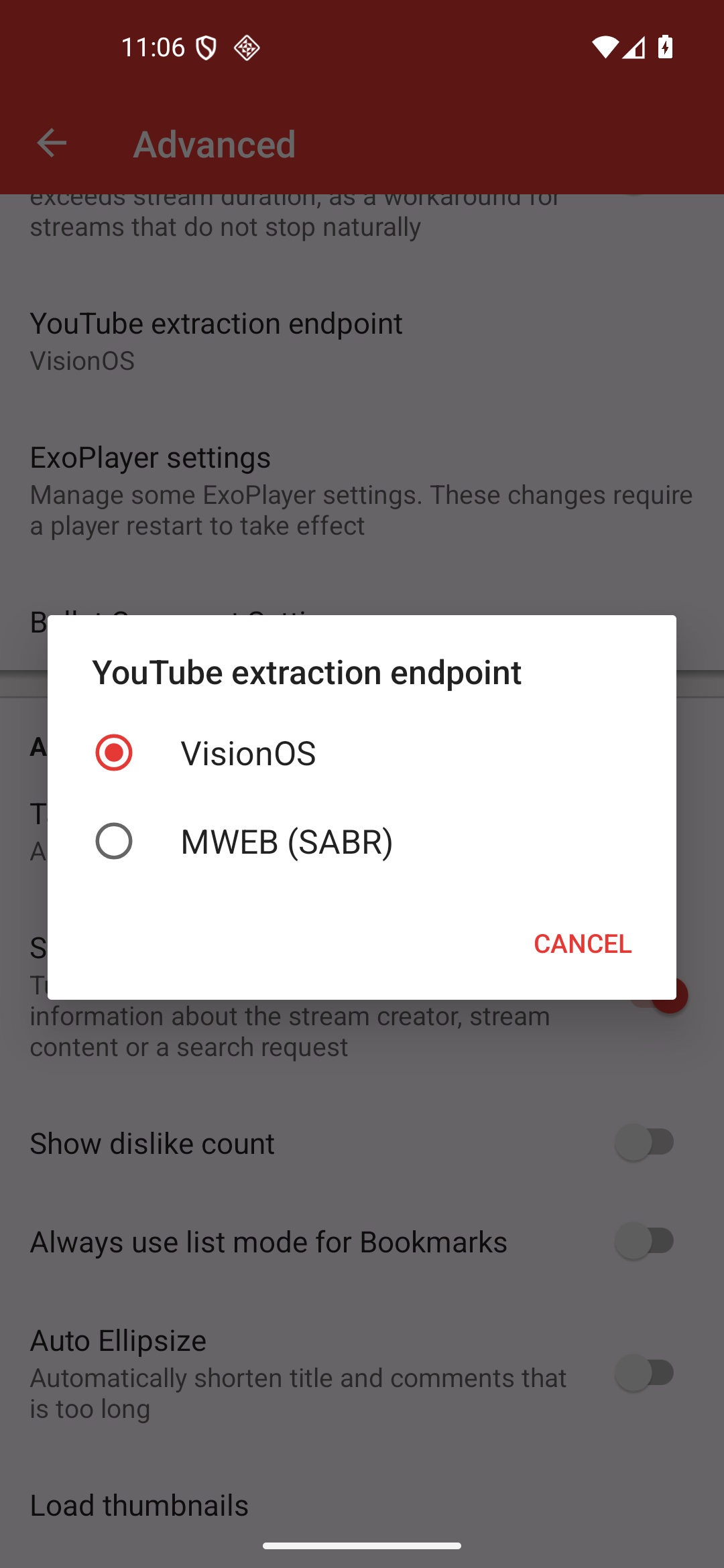
Reference capture: Android 16/API 36 on an anonymous installation. 1 is the picker; the choices available in your own build can differ.
#2686 is a concrete example of an older endpoint comparison: the maintainer asked whether Android VR (DASH) was selected and advised testing MWEB (SABR). That picker entry no longer exists. Treat the old comparison as historical evidence, not as a promise that MWEB fixes every network or account failure.
The issue history shows why the exact stage matters. In #2901, playback stopped after the phone went to sleep and the report included an UnknownHost destination. In #2905, playback worked but a SABR download failed on a VPN. They are both “YouTube/SABR” reports, but they need different evidence and should not be merged into one generic WebView or DNS diagnosis.
Minimum playback report
Video URL and service:
PipePipe version / Android version:
Endpoint before and during the failure:
Logged in or out:
Network country / VPN or proxy state:
Video type and selected quality/codec, if shown:
Private DNS / blocker / firewall state and blocked host, if any:
Failure point (start / time / seek / quality / return to app):
Exact visible message and generated report:
One-variable retest and result:
Do not mix with WebView errors
The exact WebView unavailable message has its own dedicated guide. A current WebView does not rule out a network or SABR failure, and a Source error does not prove that WebView needs updating.